AUTOCAD FOR DESIGN CAREERS
AutoCAD Classes in Vadodara
Learn AutoCAD through practical 2D drafting, 3D modelling, technical drawings and real project work with expert guidance, certification and career support.
45 Days | 2 hrs per day | Small Batches | Practical Projects




Practical AutoCAD training · Vadodara
24,000+
Students trained
30+
Years of design training
4.9/5
Google & Justdial rating
500+
Companies trust our training
300+
Hiring companies
9/10
Students achieve career growth
Course Highlights
Course Content
Joining Process
Certification
Student Projects
Student Support
Who Is AutoCAD Training For?
Practical learning for students, working engineers and people starting a new career.
Students & Freshers
ITI, Diploma & B.Tech students and fresh graduates can build practical AutoCAD skills before placements.
Working Engineers
For production, quality, maintenance, site and project roles: build confidence with engineering drawings.
Career Switchers
Starting from zero? Learn AutoCAD step by step, with no prior technical background needed.
What You’ll Learn in AutoCAD Training
From first drawing to professional 2D drafting and essential 3D modelling.
01 — AutoCAD Fundamentals
Interface, setup, units, coordinate systems and basic drawing commands.
Week 02 — Modify Tools & Properties
Move, copy, rotate, mirror, offset, trim, extend, fillet, chamfer and object properties.
Week 03 — Annotations, Text & Leaders
Dimensions, text styles, notes, leaders, hatching and drafting standards.
Week 03 — Isometric Drawing
Isometric setup, axes, isocircles and clear isometric drawings.
Week 04 — Advanced Commands
Blocks, attributes, layers, external references, templates and productivity tools.
Week 05 — Technical Drafting
Mechanical, electrical, civil and architectural drafting workflows.
Week 05 — Plot Frames & Layouts
Paper space, viewports, title blocks, scales, page setup and print-ready output.
Week 06 — Essential 3D
3D workspace, coordinate systems, solids, surfaces and core 3D operations.
Professional Course Completion — 1.5 Months
Complete the professional 2D track with a guided portfolio and project review.
Week 07 — Advanced 3D Modelling
Solid editing, complex forms and project-based modelling practice.
Week 09 — Viewports, Materials & Rendering
Camera views, visual styles, materials, lighting and presentation output.
Master Course Completion — 2.5 Months
Finish the extended track with advanced 3D work, final review and certification.
Course Outcomes
Build a portfolio of technical drawings ready to discuss in interviews and project reviews.
Mechanical Assembly Drawing
Mechanical Stream · GD&T · Tolerances · BOM
Detailed Part Drawing
Mechanical Stream · Dimensions · Fits · Notes
3D Component Study
3D Modelling · Features · Views · Layouts
Production Drawing Set
Industry workflow · Sections · Callouts · Output
Why Learn AutoCAD at Hypersoft
Training designed around how engineering drawings are created and used at work.
Industry-Updated Curriculum
Learn current tools, drawing practices and industry-relevant workflows.
Industry-Experienced Trainers
Learn from trainers with practical design and engineering experience.
Hands-On Learning
Practice through guided exercises, technical drawings and real project work.
1-to-1 & Long-Term Support
Get individual help and continued support for revision, doubts and projects.
Career & Placement Support
Get resume, interview and career guidance for relevant design opportunities.
Certificates Trusted by Industry, Recognized Internationally
Training backed by Hypersoft’s Autodesk Authorized Training Centre status and ISO 9001:2015 certification.
Industry-Focused Certification
Practical project-based learning designed for engineering and technical roles.
Up to 3× Faster Shortlisting*
Based on Hypersoft’s 7-year placement data, certified students were shortlisted up to 3× faster than the comparison group.

3 Steps to Start Your CAD Career
Clear guidance from your first conversation through career preparation.
Visit Hypersoft & Choose the Right Course
We understand your goals and recommend the most suitable course, with honest guidance.
Learn, Practice & Build Industry Skills
Practice on real industrial projects, clear your doubts and become confident with CAD tools.
Build Your Resume & Start Applying
Prepare for interviews and connect with our placement network.
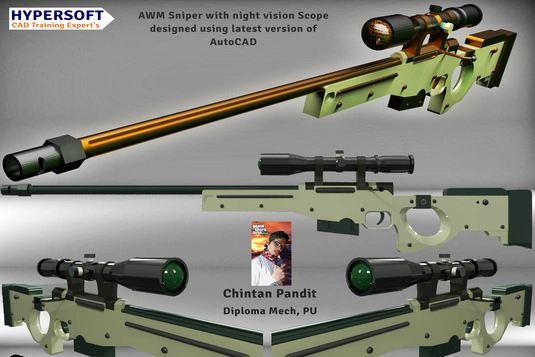
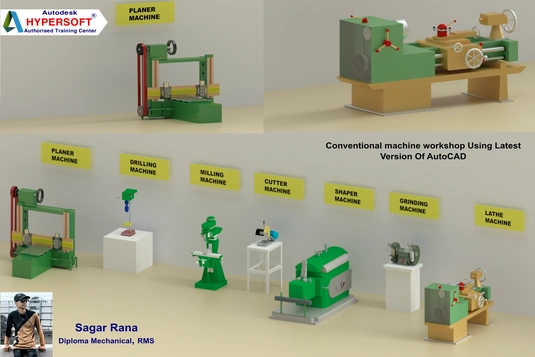
Students’ AutoCAD Projects
Explore examples of student drafting and design work.
Mechanical Assembly Drawing
BOM · GD&T · Tolerances

Mechanical Assembly Drawing 2
Assembly · Part Drawings
AutoCAD Student Project
Drafting · Dimensions
Where Can AutoCAD Take Your Career?
Apply drafting skills across engineering, construction and design teams.
Mechanical Design
Manufacturing, fabrication and industrial applications. Work: Component drawings · Assembly drawings · P&ID · HVAC · Industrial layouts Roles: CAD Drafter · P&ID Drafter · Fabrication Detailer
Electrical Design
Electrical systems, control panels and industrial installations. Work: Panel layouts · SLD drawings · Control circuits · Wiring Roles: Panel Drafter · Electrical Drafter · CAD Drafter
Civil & Architecture
Residential, commercial, structural and infrastructure projects. Work: Floor plans · Elevations · Sections · Site plans · Structural drawings Roles: Civil Drafter · Architectural Drafter · Layout Engineer
Interior & Landscape Design
Residential, commercial and industrial spaces. Work: Furniture · Floor plans · False ceilings · Interior details Roles: Interior Drafter · Modular Furniture Drafter
Our Students Work At
Hypersoft students build design careers with engineering and manufacturing teams.






Learn Before You Decide. All Completely Free.
Explore AutoCAD and career options before enrolling.
AutoCAD Shortcuts Guide
Must-know shortcuts for faster drafting.
Career Roadmap
A practical roadmap for students preparing for CAD careers.
Download Free Software
Official resources to get started with AutoCAD.
Laptop Buying Guide
What to look for in a laptop for CAD learning.
Questions We Get Asked Every Day
What is AutoCAD?
Computer-aided design software used to create precise 2D drawings and 3D models for engineering, architecture, construction and manufacturing.
How many types of AutoCAD are there?
AutoCAD includes specialized toolsets for mechanical, architecture, electrical, civil and other workflows.
Why is AutoCAD important for mechanical engineers?
It helps document components, assemblies, dimensions and manufacturing details clearly.
What does an AutoCAD Mechanical Course offer?
Drawing setup, drafting, editing, annotation, dimensioning, layouts, plotting and project skills.
Why is AutoCAD crucial for civil engineers?
Civil teams use CAD for plans, elevations, sections, site layouts and construction details.
What is covered in a Civil AutoCAD course?
Drawing setup, layers, plans, elevations, dimensions, layouts and print-ready sheets.
Why is AutoCAD useful for electrical engineers?
It supports panel layouts, schematics, wiring plans, single-line diagrams and installation drawings.
What opportunities are available after learning AutoCAD?
Career paths include CAD drafter, design assistant, detailer and drafting roles based on your background.
Who can learn AutoCAD?
Students, graduates, working engineers and beginners can learn from the fundamentals.
Ready to Go From Student to Hired Designer?
24,000+ students have built their design careers with Hypersoft since 1994.
Ask us about upcoming batches, class timings and the right course for your goals.
Accordion Item 1
Accordion Item 2
What Next?
AutoCAD is the foundation. Pair it with another tool and expand the design work you can take on.